Does Google Actually Index TikTok Videos?
Yes — and it has been doing so for a few years now. If you search Google for a how-to query, a recipe, or a trending topic, you've almost certainly seen TikTok video thumbnails show up in the results. Google treats public TikTok pages as crawlable web content, just like any other website.
What changed in 2025 and 2026 is the scale and frequency of this indexation. Google's Video Search results now pull heavily from TikTok for informational, tutorial, and product-discovery queries. In my experience managing SEO for content-heavy accounts, TikTok videos have become one of the fastest-moving formats to appear in Google's top results — sometimes within 24 hours of posting.
The opportunity here is real. Most TikTok creators focus entirely on the in-app algorithm — views, shares, watch time — without thinking about Google at all. That gap is your advantage.
Why TikTok SEO Matters More Than Ever in 2026
There are two searches happening simultaneously when someone looks for something online in 2026. The first is the traditional Google search. The second — increasingly — is a TikTok search. What's fascinating is that these two searches are starting to overlap.
Google has always valued diverse content formats. With the growth of AI Overviews eating up text-based clicks, video results are now one of the few areas where organic clicks are still strong. When a video thumbnail appears in Google results, people click it at a noticeably higher rate than a standard blue link. In my experience, optimised TikTok videos in Google's video carousel can drive significant referral traffic to a creator's profile or linked website — traffic that most creators aren't even tracking.
TikTok SEO and Google SEO are not the same thing — but they share the same foundation: clear keywords, genuine value, and content people actually want to watch. Get the fundamentals right and both channels benefit.
If you run a business, a personal brand, or any kind of content operation, ignoring TikTok's presence in Google Search in 2026 is leaving real visibility on the table. Check what you're already ranking for using the free SEO Audit Tool at Behind the Search — it can show you how your existing content is performing before you add TikTok to the mix.
How Google Discovers and Indexes TikTok Content
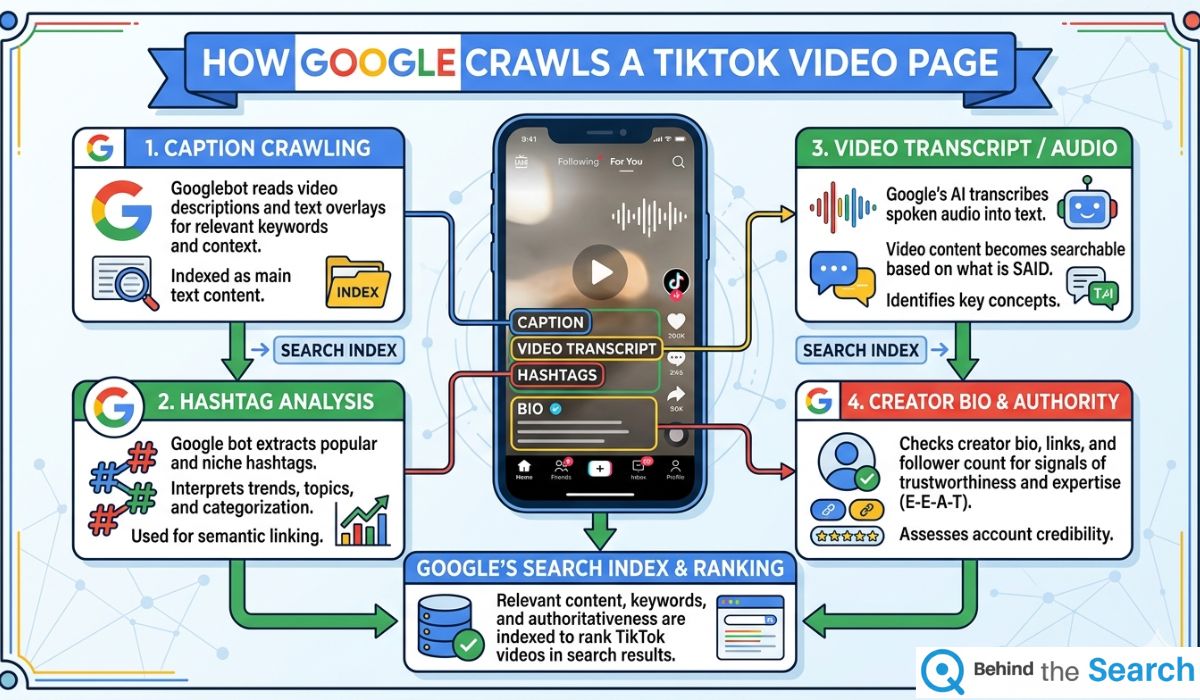
Understanding the mechanics here makes everything else click. Google's crawler visits TikTok's public pages the same way it visits any other website. Each public TikTok video has its own URL and page — and that page contains text data that Google reads and indexes.
The main sources of text data Google picks up from a TikTok page are:
- The caption — the text you write when you post the video. This is the single most important SEO signal on a TikTok page.
- Hashtags — these appear as clickable text on the page and act like keywords in Google's eyes.
- Auto-generated captions / subtitles — TikTok automatically transcribes what you say in your video. Google can read this text too.
- Your profile bio and username — these appear on every video page you post and contribute to topical authority signals.
- Comments and sounds — secondary signals that contribute to how Google classifies the page's topic.
In my experience, the auto-generated transcript is massively underestimated as an SEO signal. When you clearly say your target keyword in the first ten seconds of your video, TikTok transcribes it and places that text directly on the page. Google indexes it. This is a free, powerful on-page keyword signal that most creators completely overlook.
On-Video SEO: What to Say and Show
This is where TikTok SEO differs most from traditional text SEO. The content of the video itself — what you say and show — has a direct influence on how Google classifies and ranks it.
Say Your Keyword Early and Clearly
Aim to speak your primary keyword in the first five to ten seconds of your video. TikTok's auto-captions pick this up and it appears as text on the page. Think of it as the H1 heading of your video. For example, if your video is about "how to make cold brew at home," open with exactly those words out loud, not just on a text overlay.
Use On-Screen Text Strategically
Text overlays within your video are read by TikTok's system and can influence how the video is categorised. Use your keyword or close variants in your first on-screen text card. Keep it clear, legible, and relevant — not just decorative. In my experience, videos that match their spoken keyword, on-screen text, and caption keyword all three together consistently outperform videos where these elements don't align.
Match Search Intent, Not Just Keywords
Before creating any video, ask yourself: what is the person searching this keyword actually trying to do? Are they looking for a quick answer, a tutorial, a product comparison, or entertainment? The format of your video needs to match the intent behind the keyword. A 15-second text card video will not rank for a how-to query where Google's algorithm expects step-by-step instructional content.
"The creators who rank on Google aren't doing anything mysterious. They're just being specific, they're saying what the video is about clearly, and they're actually teaching or showing something useful. That's it."
Caption and Hashtag Optimisation
Your TikTok caption is your most direct SEO lever. Unlike Instagram where captions are mostly social signals, TikTok captions are indexed as page text by Google. This makes them behave more like meta descriptions and intro paragraphs on a blog post.
Write Captions Like a Search Snippet
Put your primary keyword in the very first line of your caption — before the "more" cutoff that TikTok shows in the app. This is the text most likely to be picked up as the page's main description by Google. Follow it with a short, useful sentence that expands on what the viewer will learn or see.
For example, instead of: "omg this changed everything ✨✨"
Write: "How to make cold brew coffee at home — no special equipment needed. 3 ingredients, 12 hours, and it tastes better than anything you'll buy."
The second version tells Google exactly what this page is about. The first tells it nothing.
Use Specific, Relevant Hashtags
Forget the strategy of stacking ten generic hashtags like #fyp, #viral, and #foryou. These have no search value on Google — they're too broad to signal topical relevance. Instead, use 3 to 5 specific hashtags that match the actual topic of the video.
- One broad category hashtag (e.g. #coffeehacks)
- One specific keyword hashtag (e.g. #coldbrewcoffee)
- One intent-based hashtag (e.g. #coffeetutorial or #coffeeathome)
These act like keyword tags on a blog post and help Google understand the topical cluster your video belongs to.
Use the free Keyword Density Checker at Behind the Search to check how well your TikTok captions use your target keywords — a quick way to spot whether you're under- or over-optimising before you post.
Profile Optimisation for TikTok SEO
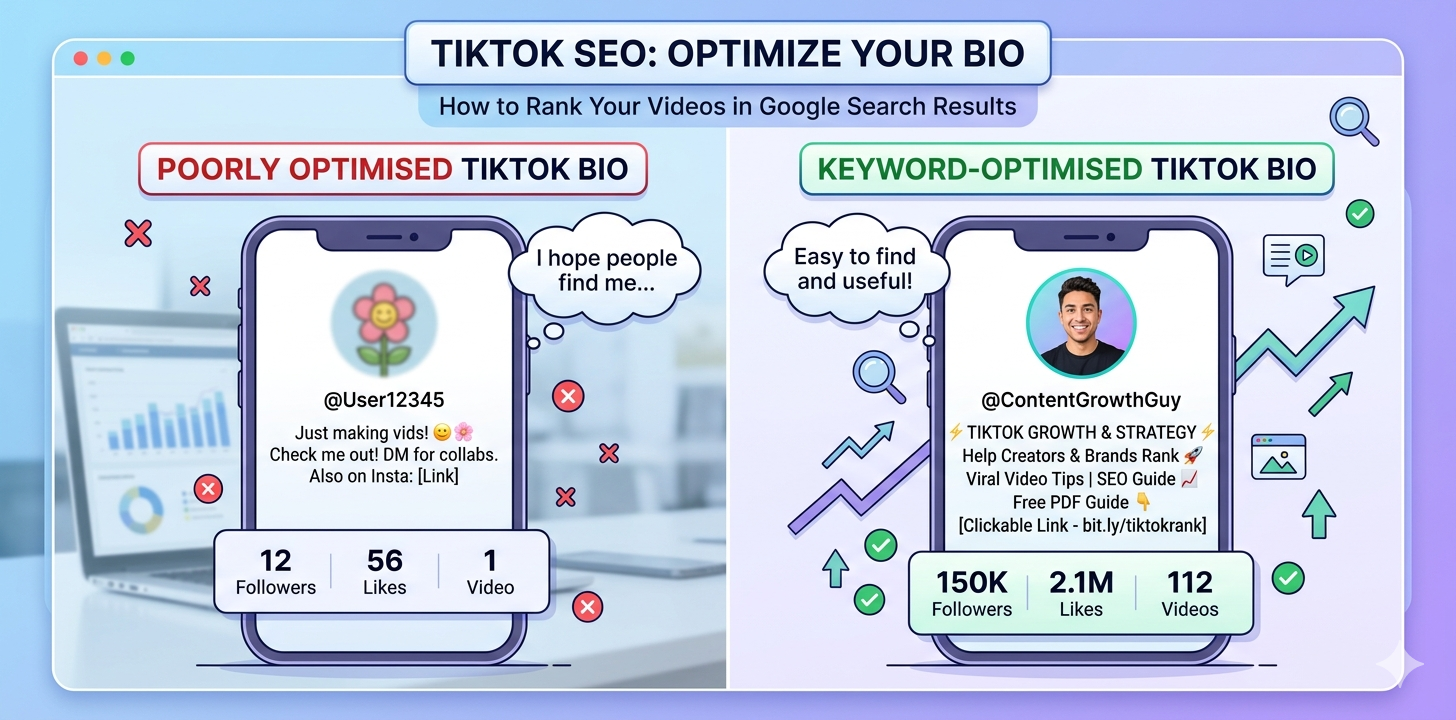
Your TikTok profile page is indexed by Google as a standalone web page. Every video you post links back to it. That means your profile contributes to your topical authority in Google's eyes — similar to how a website's homepage and about page signal what the site is about.
Your Username
If you're building a niche account, include your topic or niche keyword in your username where possible. A username like @coffeewithPratibha signals topical focus to Google's crawler far more clearly than a generic handle. In my experience, niche-specific usernames also improve click-through rates when TikTok profiles show up in Google Brand Panel results.
Your Bio
Write a clear, keyword-inclusive bio that states exactly what your account covers. Don't waste the 80-character bio on emojis alone. Instead, write something like: "Cold brew & home coffee tutorials. New recipe every week." This text appears on every video page you post and builds topical context across your entire content library.
Keep Your Account Public
This one sounds obvious but it's worth saying clearly: private TikTok accounts are not indexed by Google. If your account is set to private, your videos do not exist as far as Google Search is concerned. Make sure your account is public and that you haven't accidentally restricted indexation through TikTok's privacy settings.
Your TikTok SEO Action Checklist
In my experience, the creators who see TikTok traffic show up in their Google Search Console are the ones who follow a consistent optimisation process — not just on one video, but on every video they post. Here's the complete checklist:
- ✓Research your target keyword on both Google and TikTok search before filming
- ✓Say your primary keyword clearly in the first 10 seconds of the video
- ✓Use your keyword in the first on-screen text card or overlay
- ✓Write a keyword-first caption — put your main keyword before the "more" cutoff
- ✓Add 3–5 specific, relevant hashtags (not just #fyp or #viral)
- ✓Ensure auto-captions are on and accurate — edit them if TikTok transcribes incorrectly
- ✓Keep your account set to public so Google can crawl your pages
- ✓Include your niche keyword in your TikTok bio
- ✓Match search intent — format your video to fit what searchers actually want to see
- ✓Link your website in your TikTok bio to benefit from any referral traffic
There's no shortcut here that Google hasn't already accounted for. The approach that works — in 2026 and beyond — is creating videos that genuinely answer what someone is searching for, and making it easy for Google to understand exactly what that is. Apply this checklist consistently and TikTok becomes a second discovery channel running alongside your existing SEO efforts.
Don't obsess over keyword density to the point that your captions sound robotic. Google's systems — and real viewers — both respond poorly to over-optimised, unnatural language. Write for people first, then layer in your keyword signals.
If you want to go deeper on content SEO and understand how readability, structure, and keyword use interact to build authority, the guide on Readability SEO at Behind the Search is a natural next read. The same principles that make written content rank well transfer directly to how you structure your TikTok captions and scripts.
Frequently Asked Questions

I've spent years studying how Google discovers, crawls, and ranks content across every format — from blog posts to short-form video. I created Behind the Search to make powerful SEO insights and tools accessible to creators and businesses who want to grow without expensive agency retainers. Everything here is practical, tested, and written to drive real results.